CNCQuote Veste, da je povpraševanje prišlo. Samo najti ga ne morete.
Prejšnji teden ga je stranka poslala po e-pošti. Danes je zakopano med neželeno pošto, neskončnimi verigami odgovorov in priponkami z nejasnimi imeni — iskanje pa je zadetek ali zgrešek. Medtem stranka čaka, vi pa še vedno iščete pravo risbo, STEP datoteko in zadnjo revizijo. CNCQuote ta kaos spremeni v ponudbo v nekaj minutah: vse je na enem mestu, s 3D ogledom, takojšnjim izračunom mase in stroškov, ocenjevanjem z UI ter sinhronizacijo z Iskrex Books.
- Vsak dan poganja pravo delavnico
- Licenca CAD ni potrebna
- Ponudbe v EN · DE · SI
- Sinhronizirano z ERP
- 10× hitreje kot priprava ponudb po e-pošti
- 6 kopilotov UI v sistemu
- 3 vgrajeni jeziki ponudb
- 1 sistem od povpraševanja do računa
Od e-pošte do končne ponudbe — pred kamero
Dva posnetka neposredno iz delujočega sistema. Podnapisi v angleščini, nemščini in slovenščini — vključeni sta tudi nastavitev hitrosti predvajanja in celozaslonski način.
Od prejetega povpraševanja do naročila. En sistem.
Vsi koraki, skozi katere gre ponudba v vaši delavnici — že povezani. Brez preglednic, brez kopiranja in brez vprašanja “v kateri mapi je bila tista STEP datoteka?”
-
01
Povpraševanje prispe
Stranke naložijo kose v svojem portalu — ali pa preprosto posredujete e-poštno povpraševanje, UI pa pripravi ogrodje ponudbe ter doda stranko in datoteke.
-
02
Takoj si oglejte vsak kos
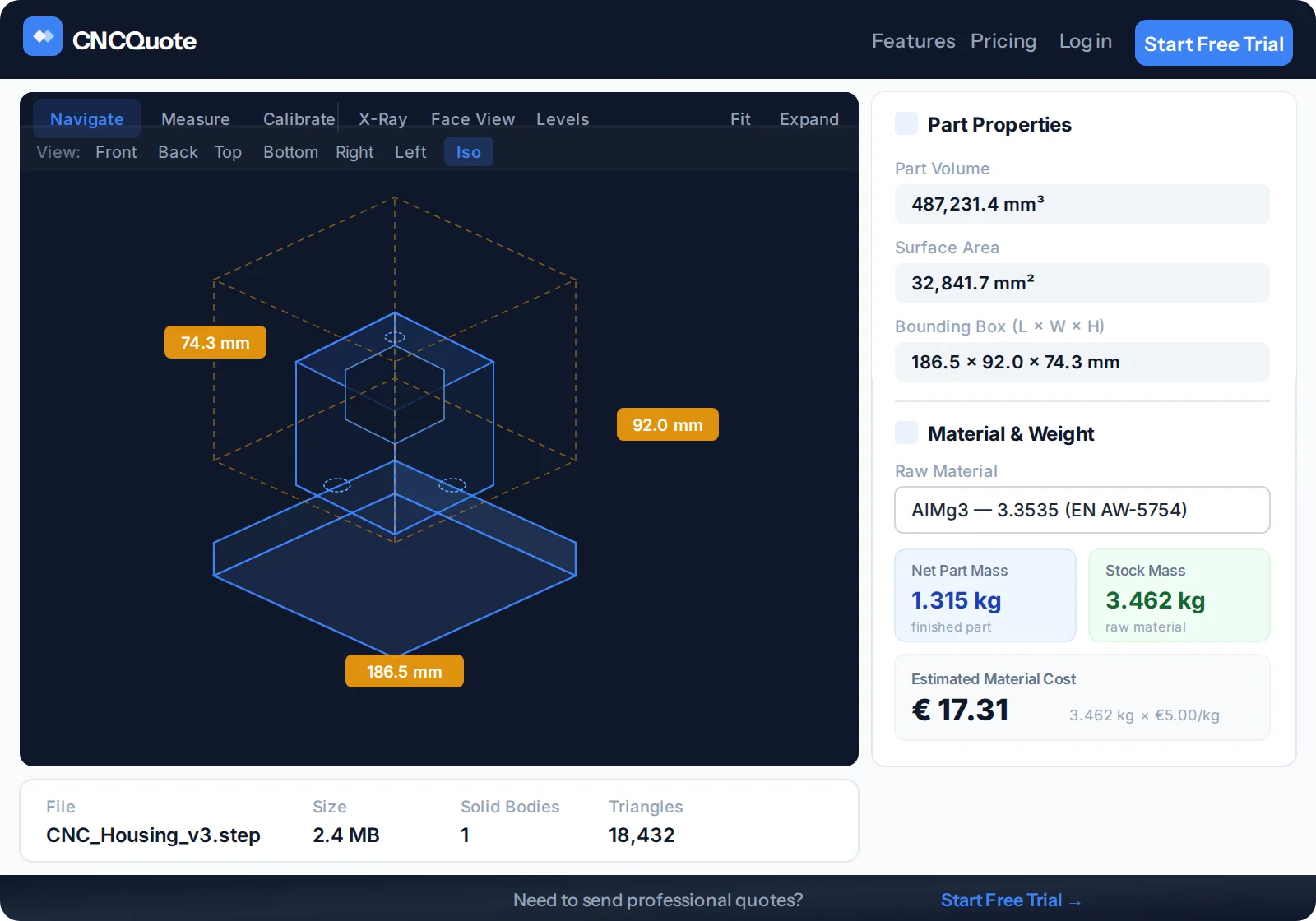
STEP, DXF, DWG in PDF se odprejo neposredno v brskalniku: vrtite, merite, uporabite rentgenski pogled, prerez ali redakcijo. Licenca CAD ni potrebna.
-
03
Surovec & strošek v enem koraku
Batch Mass na podlagi geometrije predlaga surovec za vsak kos, z UI prebere kakovost materiala z risbe in določi ceno iz vaše baze v €/kg.
-
04
Ocenite z UI, odločite se sami
Ocena obdelave, prilagojena vašim strojem, predlaga ure in €/kos. Uporabite jo z enim klikom — ali jo v klepetu dopolnjujte, dokler ne razume vašega postopka.
-
05
Pametno vključite kooperante
Kooperantom pošljite kose z risbami in povpraševanji PDF, na enem zaslonu primerjajte njihove cene s svojimi, samodejni opomniki pa naj spodbudijo tiste, ki se ne odzovejo.
-
06
Pošljite, spremljajte, zaključite
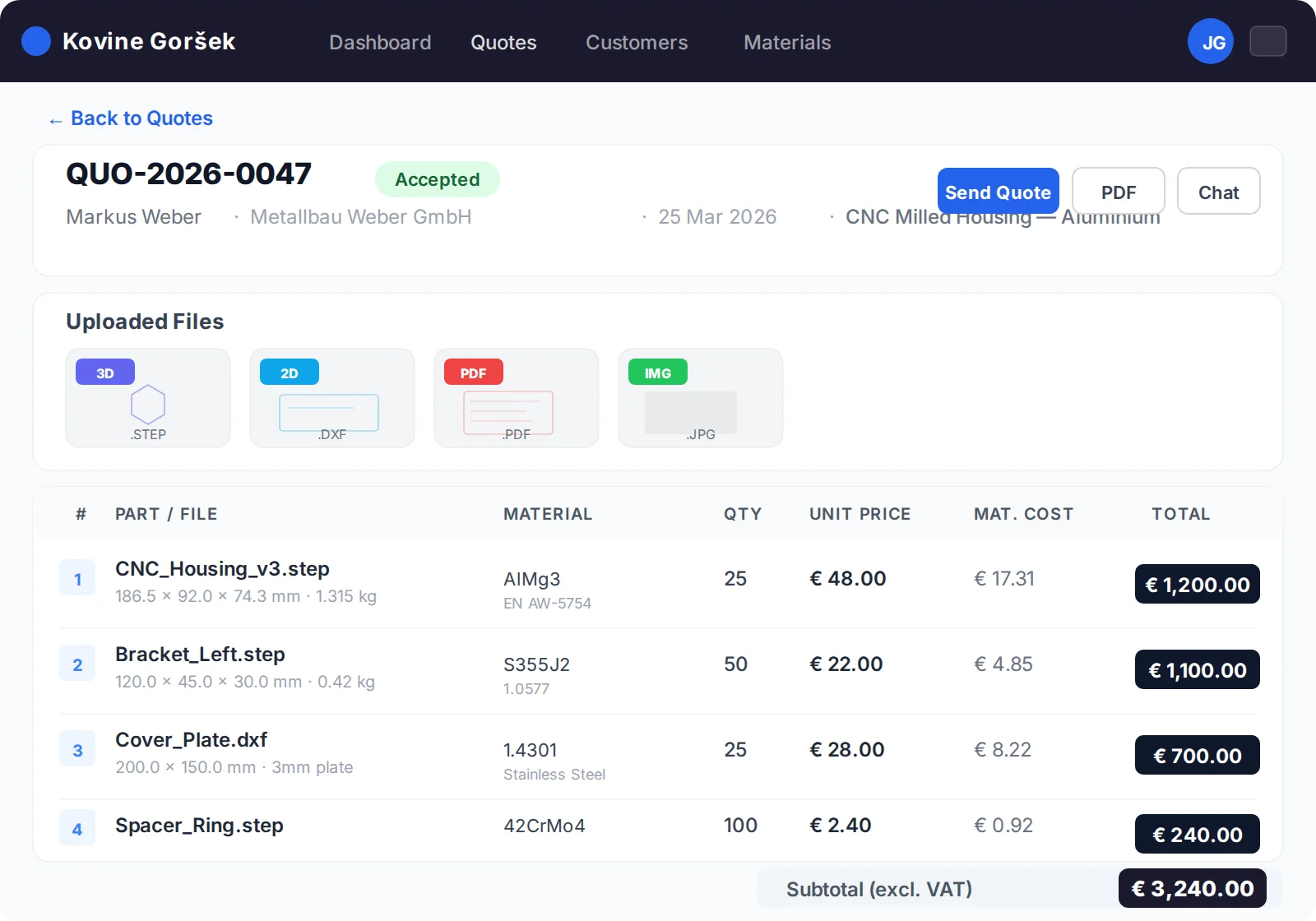
Večjezična ponudba PDF s sprotnim sledenjem dostavi. En klik za sprejem postane potrditev naročila — že sinhronizirana z računovodstvom Iskrex Books.
Vsako povpraševanje. Ena čakalna vrsta. Nič ne uide.
Iščite, filtrirajte in označujte vse ponudbe v prodajnem lijaku. Čakalna vrsta vam pokaže, kaj potrebuje pozornost, še preden mora kdo vprašati.
- Barvne zastavice — na prvi pogled označite pomembne ali zaključene ponudbe
- Alarmi ob nedostavi — če e-pošta s ponudbo ne prispe, se celotna vrstica obarva rdeče
- Pike za neprebran klepet — takoj vidite, kje je stranka odgovorila
- Celoten pregled lijaka — ustvarjene, čakajoče, sprejete in zavrnjene ponudbe — z delnimi vsotami
| Ponudba | Stranka | Kosi | Status | Vmesni seštevek |
|---|---|---|---|---|
| QT-2601 | Alpska Preciznost d.o.o.Nina Kovač | 3 | Čaka na odobritev | €4,820.00 |
| QT-2598 | Jadran Mehanika d.o.o. Luka Zupan | 1 | Sprejeta | €1,145.00 |
| QT-2597 | Triglav Orodjarna d.o.o.Maja Vidmar | 12 | Ustvarjena | — |
| QT-2595 | Sava Industrija d.o.o.Rok Kralj | 5 | Ni dostavljena | €9,310.00 |
Surovec in strošek materiala — za celotno ponudbo naenkrat
Ena stran naloži vse kose iz ponudbe, analizira geometrijo in opravi izračune, ki jih je kalkulant prej izvajal v programu CAD, kalkulatorju in treh zavihkih brskalnika.
- Samodejni predlogi surovca iz omejitvenega okvirja vsakega kosa — plošča, palica ali cev, z dodatki +5/+10 mm na en klik
- UI prebere glavo risbe — kakovost materiala in DIN neposredno z risbe PDF
- Vaša baza materialov — gostote, različice oblik in €/kg z zgodovino cen
- Podatki, pripravljeni za nabavo — seznami surovcev v PDF, združevanje paličnega materiala in povpraševanja dobaviteljem, vnaprej razvrščena po materialu
Šest kopilotov UI. Vaša presoja ostaja glavna.
UI pripravi osnutek kalkulacije, načrtuje tehnološki postopek in vnese podatke. Vsaka številka ostane predlog, dokler je ne uporabite — vsaka ocena pa se uči o vaši delavnici iz opomb o strojih in vaših dejanskih ur.
Ocenite & razpravljajte
Ure in €/kos na podlagi risb in 3D geometrije — nato oceno v naravnem jeziku izpopolnjujte, dokler se ne ujema z dejansko izvedbo naloga.
- 1Odrez surovca na dolžinolastna izvedba
- 25-osno CNC-rezkanjelastna izvedba
- 3Cementiranje na 58 HRCkooperant
- 4Cilindrično brušenjekooperant
- 5Končna kontrola + poročilolastna izvedba
Načrtujte postopek
Razporeditev med lastno izvedbo in kooperante, kritične značilnosti ter odprta vprašanja — s predajo v povpraševanja kooperantom z enim klikom.
Posredujte e-pošto in prejmite ponudbo
Povpraševanj, ki prispejo po e-pošti, ni več treba prepisovati. Posredujte jih v nabiralnik za uvoz — kosi, datoteke in stranka vas že čakajo v čakalni vrsti.
V ekipi so tudi:
- UI urejanje datotek — nalaganje 50 datotek postane urejena razvrstitev po kosih
- UI prepoznavanje materiala — za celotne ponudbe naenkrat
- UI iskanje dobaviteljev — poišče nove kooperante po državah
Vaši kooperanti tekmujejo na enem zaslonu
Kose pošljite partnerjem za toplotno obdelavo, brušenje ali premaze, ne da bi ročno napisali eno samo e-poštno sporočilo — nato se odločite s številkami drugo ob drugi.
- Povpraševanja z enim klikom — PDF, risbe in varna povezava do portala za vsakega kooperanta
- Ceno vnesejo sami v portalu za kooperante — na vaši strani ni preklapljanja med računi
- Samodejni opomniki po 3 in 5 dneh — pred pošiljanjem jih potrdite prek Telegrama
- Odobrite & obvestite izbrane — dodelitve, cene in nadaljnji koraki se zabeležijo v ponudbi
Ponudbe, ki same poskrbijo za nadaljnje korake
Najdražja ponudba je tista, pri kateri nihče ni preveril odziva. CNCQuote spremlja vsako ponudbo po pošiljanju — in vas opozori le, ko je to pomembno.
- Resnično sledenje dostavi — veste, da je e-pošta s ponudbo dejansko prispela, ne le da je bila poslana
- Samodejno spremljanje veljavnosti — opozorilo 7 dni pred iztekom ponudbe in samodejno zaprtje po 60 dneh
- Vljudni opomniki strankam — e-pošta “kakšen je trenutni status?” z enim klikom in zaščito pred neželeno pošto
- Klepet v živo pri vsaki ponudbi — vprašanja, fotografije in datoteke ostanejo pripete nalogu, namesto da se izgubijo v nabiralnikih
Ponudbe in računovodstvo končno govorijo isti jezik
Vsaka številka ponudbe, stranka in potrditev naročila se samodejno zrcali med delovnim okoljem za ponudbe in ERP Iskrex Books. Nihče nikoli več ne vnaša istega naročila dvakrat.
Delovno okolje CNCQuote
Povpraševanja, CAD datoteke, določanje cen, kooperanti in klepet s strankami.
ERP Iskrex Books
Številke ponudb, stranke, delovni nalogi in izdajanje računov — pisarniško zaledje proizvodnje.
- Številke ponudb QT-
- Stranke & plačniki
- Potrditve naročil
- Statusi & sklici
- Risbe & datoteke
Pogled v delovno okolje
Kliknite katerikoli posnetek za povečavo
Običajen dan priprave ponudb — prej in potem
Stari način
- Odprite CAD samo za tehtanje vsakega kosa — 15 minut na kos, če je licenca prosta
- Ročno prepisujte e-poštna sporočila dobaviteljem in kooperantom ter enkrat na mesec pripnite napačno revizijo
- “So našo ponudbo sploh prejeli?” — nihče ne ve, zato nihče ne preveri odziva
- Dobljena naročila znova vnesite v računovodstvo; številke ponudb se nikoli ne ujemajo s številkami računov
- Povpraševanja so zakopana v skupnem nabiralniku, na ključku USB in namizju nekega sodelavca
S CNCQuote
- Masa, surovec in strošek materiala za celotno ponudbo v enem koraku — v brskalniku
- Povpraševanja z enim klikom ter vedno pravi PDF in prave risbe
- Status dostave vsake e-pošte, opozorila o izteku in obvestila na Telegram so že vgrajeni
- Sprejem → potrditev naročila → ERP, samodejno in z eno številko od začetka do konca
- Ena iskalna čakalna vrsta z zastavicami, filtri, datotekami in klepetom — za celotno ekipo
Risbe vaših strank so kronski dragulji. Tako jih tudi varujemo.
2FA & ključi za dostop
Kode iz aplikacije za preverjanje pristnosti, strojni varnostni ključi in ključi za dostop (WebAuthn) za račune zaposlenih — z rezervnimi kodami in revizijsko sledjo prijav.
Strogo zaščiten skrbniški dostop
Skrbniško delovno okolje je dostopno le z dovoljenih naslovov IP ter zaščiteno z omejevanjem pogostosti prijav in preprečevanjem napadov z ugibanjem gesel.
Redakcija risb
Pred pošiljanjem kooperantom prekrijte glave risb in imena strank v dokumentih PDF — neposredno v pregledovalniku in brez nevarnosti zamenjave revizije.
Vloge za vse uporabnike
Stranke, zaposleni, skrbniki in kooperanti vidijo vsak natanko svoj del — kooperanti nikoli ne vidijo vaše stranke ali vaše marže.
Poglejte, kako sistem obdela vaša povpraševanja.
To ni predstavitev z diapozitivi — sistem vsak dan pripravlja ponudbe za resnične kose v pravi strojni delavnici. Predstavimo ga lahko z anonimiziranimi podatki delavnice ali z vašimi datotekami — nato prejmete ponudbo za svojo natančno postavitev.